Usage
Calculation of IBP Index
To calculate the IBP index use ibpmodel.ibpforward.calculateIBPindex() function. It returns a pandas.DataFrame:
For magnetic (dB) model
>>> from ibpmodel import calculateIBPindex
>>> calculateIBPindex(day_month=15, longitude=0, local_time=20.9, f107=150)
   Doy  Month  Lon    LT  F10.7     IBP
0   15      1    0  20.9    150  0.4332
>>> from ibpmodel import calculateIBPindex
>>> calculateIBPindex(day_month=[1,15,31], longitude=[-170,175,170], local_time=0, f107=120)
   Doy  Month  Lon  LT  F10.7     IBP
0    1      1 -170   0    120  0.0277
1    1      1  175   0    120  0.0260
2    1      1  170   0    120  0.0256
3   15      1 -170   0    120  0.0306
4   15      1  175   0    120  0.0288
5   15      1  170   0    120  0.0283
6   31      1 -170   0    120  0.0390
7   31      1  175   0    120  0.0366
8   31      1  170   0    120  0.0361
Instead of day of the year, the IBP index for a particular month can be calculated by entering the first three letters of that month as a string input to the variable day_month as shown in the example below. With this choice, the IBP index will be calculated for the median day of the chosen month. Check the function description for more details:
>>> from ibpmodel import calculateIBPindex
>>> calculateIBPindex(day_month=['Jan'], local_time=22)
    Doy  Month  Lon  LT  F10.7     IBP
0    15      1 -180  22    150  0.0700
1    15      1 -175  22    150  0.0699
2    15      1 -170  22    150  0.0690
3    15      1 -165  22    150  0.0687
4    15      1 -160  22    150  0.0726
..  ...    ...  ...  ..    ...     ...
67   15      1  155  22    150  0.0881
68   15      1  160  22    150  0.0816
69   15      1  165  22    150  0.0767
70   15      1  170  22    150  0.0730
71   15      1  175  22    150  0.0707

[72 rows x 6 columns]
For electron density (Ne) model
>>> from ibpmodel import calculateIBPindex
>>> calculateIBPindex(day_month=['Nov','Dec'], longitude=-160, local_time=22, elecDensity=True)
   Doy  Month  Lon  LT  F10.7     IBP
0  319     11 -160  22    150  0.0789
1  349     12 -160  22    150  0.0627
Plotting probability
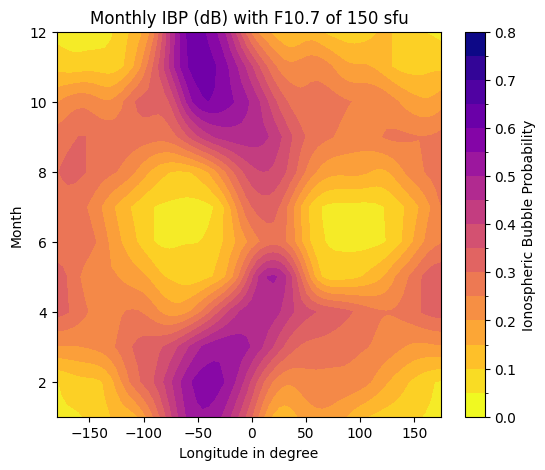
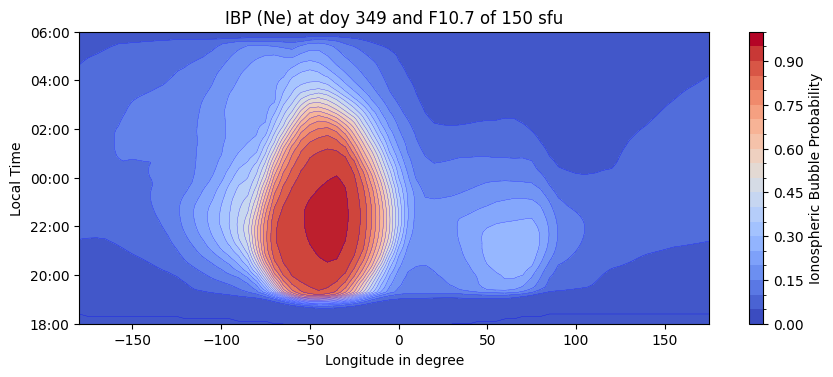
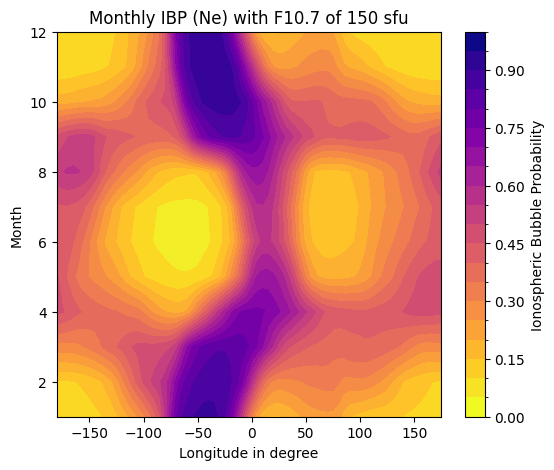
There are two functions to plot IBP index. function ibpmodel.ibpforward.plotIBPindex() and ibpmodel.ibpforward.plotButterflyData().
By default, the plot is displayed immediately. If you want to make changes or additions, the parameter getFig must be set equal to True.
Then you get matplat.axis as return value:
For magnetic (dB) model
>>> import ibpmodel as ibp
>>> ibp.plotIBPindex(doy=349)

>>> ibp.plotButterflyData(f107=150)
>>> import ibpmodel as ibp
>>> import matplotlib.pyplot as plt
>>> doys = [349, 15]
>>> fig, axes = plt.subplots(len(doys),1, layout='constrained',figsize=(9, 7))
>>> for d, ax in zip(doys, axes):
...     ax, scalarmap = ibp.plotIBPindex(d, ax=ax)
>>> ibp.ibpforward.setcolorbar(scalarmap, fig, axes, fraction=0.05)
>>> plt.show()

For electron density (Ne) model
>>> import ibpmodel as ibp
>>> ibp.plotIBPindex(doy=349,elecDensity=True)
>>> ibp.plotButterflyData(f107=150,elecDensity=True)
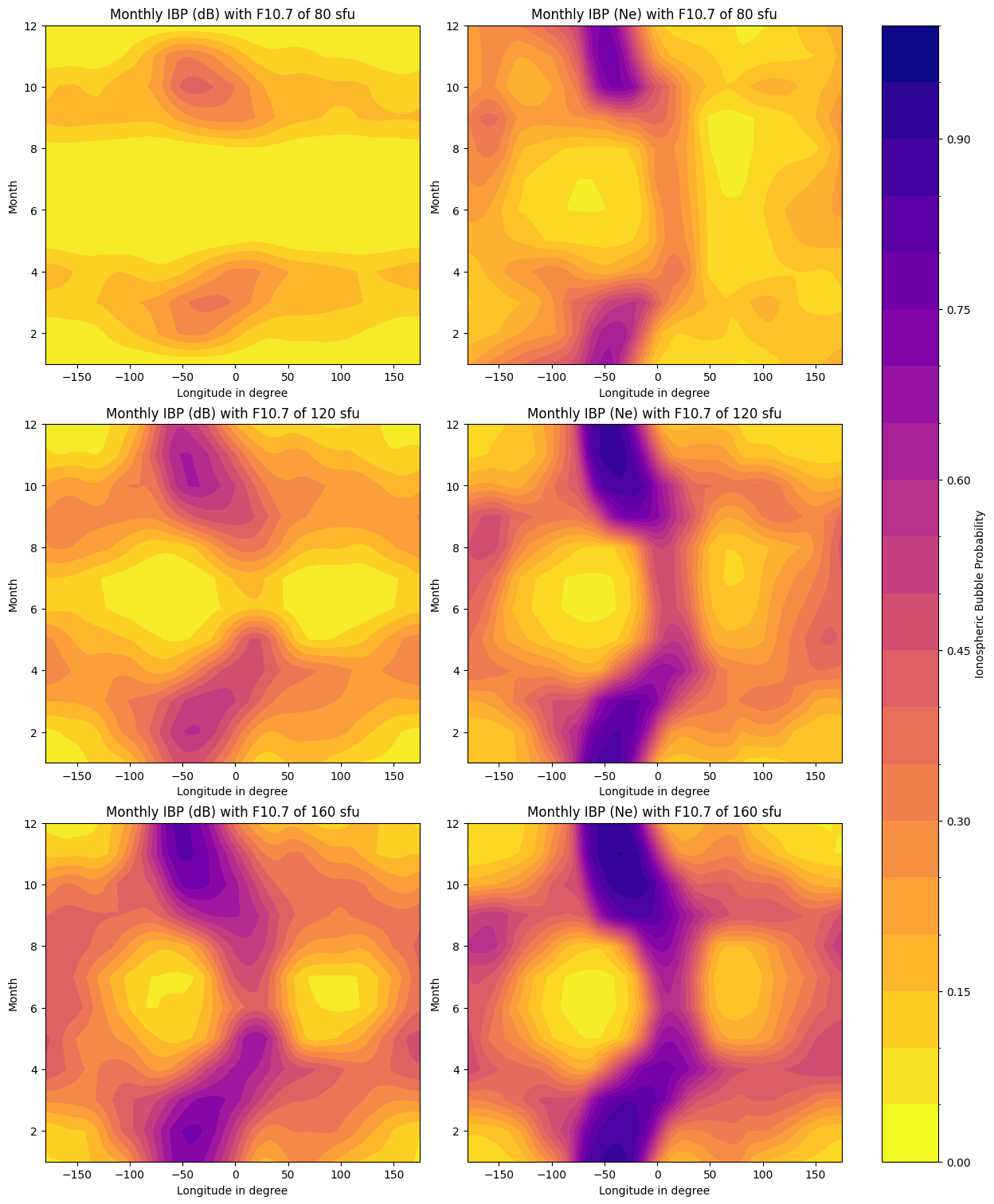
Plotting of magnetic and electron density Models
>>> solar_values = [80, 120, 160]
>>> elecD = [False, True]
>>> fig_bfly, axes_bfly = plt.subplots(len(solar_values), len(elecD), layout='constrained',figsize=(12.4, 5*len(solar_values)))
>>> for axes, so in zip(axes_bfly, solar_values):
...     for b, ax in zip(elecD, axes):
...         ax, scalarmap = ibp.plotButterflyData(so, ax=ax, elecDensity=b)
>>> ibp.ibpforward.setcolorbar(scalarmap, fig_bfly, axes_bfly)
>>> plt.show()
Read coefficient file
You can load the coefficient file. ibpmodel.ibpcalc.read_model_file():
>>> from ibpmodel import read_model_file
>>> c = read_model_file()
>>> c.keys()
dict_keys(['Parameters', 'Intensity', 'Monthly_LT_Shift', 'Density_Estimators', 'Density_Estimator_Lons'])
>>>
>>> c['Intensity']
array([ -22.34634838,  -11.17710961,   70.04849368,    7.0684529 ,
       -164.54246628])